“Where did that deployment checklist go again?” “I think someone jotted it down in a random Google Doc or spreadsheet somewhere…”
How many times have you seen this exact conversation play out in your team’s Slack or Teams channels? Or even worse—how many billable hours have you personally lost hunting down scattered documentation across five different Google Drive folders?
As engineering teams scale and new members join, watching important operational knowledge disperse into a black hole of unlinked documents is a classic workplace nightmare.
Modern documentation SaaS platforms like Notion, Confluence, or Slite are fantastic, but they often come with steep roadblocks: expensive monthly per-seat licensing, tedious onboarding/offboarding user management, and steep learning curves for non-technical teammates.
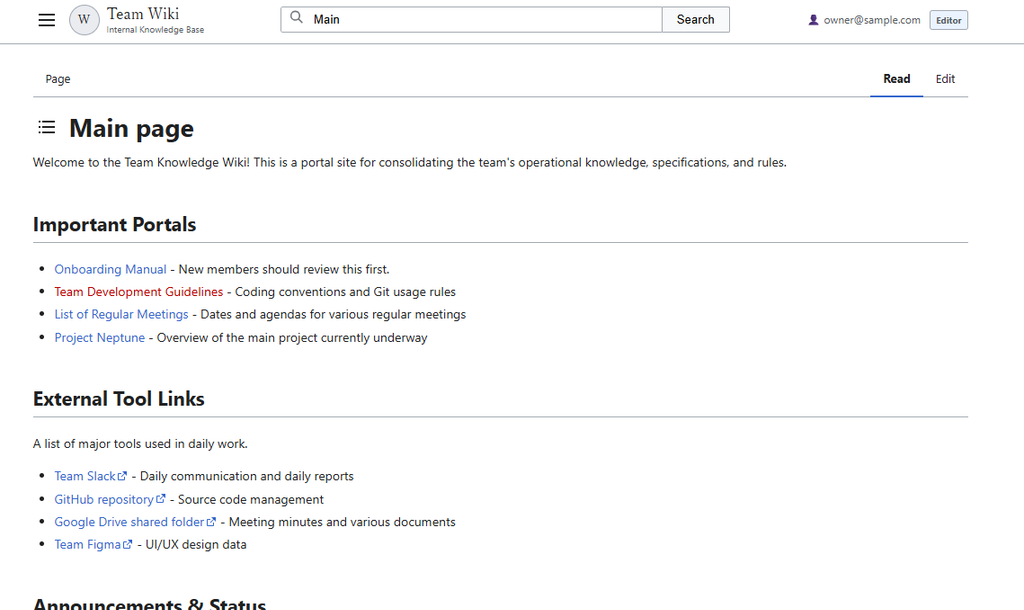
So today, we’re building a solution that costs exactly $0 in extra infrastructure: an authentic, Wikipedia (MediaWiki)-style internal knowledge base powered entirely by Google Sheets and Google Apps Script (GAS)!
True to my personal engineering motto—“Automate tedious tasks and let’s all clock out on time!”—this guide provides the complete, production-ready code you can copy and paste, followed by a comprehensive, line-by-line architectural breakdown of how both the backend and frontend work under the hood.
1. Preparing the Google Spreadsheet (Database Schema)
First, create a new Google Spreadsheet to serve as our lightweight relational database.
You will need to create two sheets (tabs). Please make sure the sheet names match the casing below exactly.
Sheet 1: Pages (Article Storage)
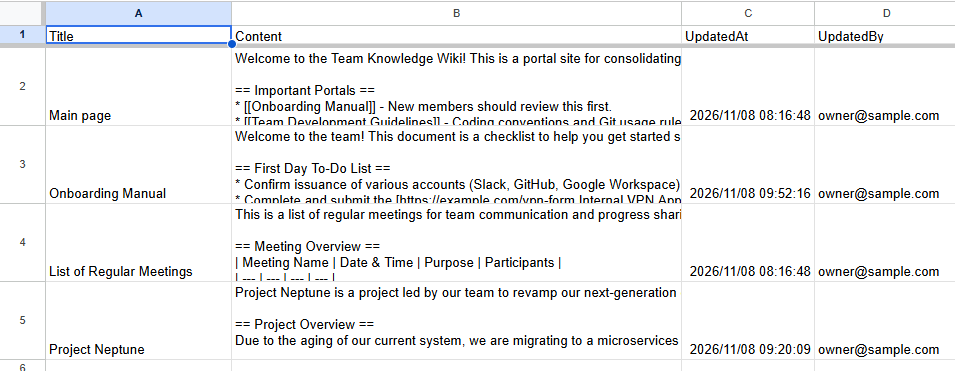
This sheet stores your wiki content, timestamps, and author metadata. Rename the first tab to “Pages” and set up row 1 with these four column headers:
- Column A: Title (The unique title of the wiki page)
- Column B: Content (The raw Wikitext/Markdown body text)
- Column C: UpdatedAt (Timestamp of the last modification)
- Column D: UpdatedBy (Google email address of the last editor)
💡 Quick Tip: To verify your setup immediately, enter “Main Page” in cell A2, and “== Welcome ==\nWelcome to our Team Knowledge Wiki!” in cell B2.
Sheet 2: Permissions (Role-Based Access Control)
This sheet handles our authentication whitelist and Role-Based Access Control (RBAC). Create a new tab named “Permissions” with the following headers in row 1:
- Column A: Email (User’s Google Account email address)
- Column B: Role (Permission role: editor or viewer)
| email (Col A) | role (Col B) | Permissions Granted |
| your-account@sample.com | editor | Read, create, edit pages, and upload image screenshots |
| member@sample.com | viewer | Read-only access, full-text search, and category navigation (Edit tab hidden) |
※ Anyone accessing the web app whose Google email is not explicitly registered in this sheet will immediately hit a hard “🔒 Access Denied” screen and will be blocked from loading any data.
Add your own Google email address in cell A2 and assign yourself the editor role in cell B2 before proceeding!
2. Complete, Copy-Paste Production Source Code
Below is the complete source code without any omissions. Copy and paste it directly into your Google Apps Script project.
① Code.gs (Backend API & Server Logic)
In your spreadsheet, navigate to Extensions > Apps Script. Replace everything inside Code.gs with the following snippet:
const ss = () => SpreadsheetApp.getActiveSpreadsheet();
const getSheet = name => ss().getSheetByName(name);
const getRows = name => getSheet(name)?.getDataRange().getValues().slice(1) || [];

// Check current user authorization (editor vs viewer)
function getUserAuth() {
  const email = (Session.getActiveUser().getEmail() || '').toLowerCase().trim();
  const row = getRows('Permissions').find(([e]) => String(e).toLowerCase().trim() === email);
  const role = row ? String(row[1]).toLowerCase().trim() : '';

  // View permission: editor or viewer
  const canView = ['editor', 'viewer'].includes(role);
  // Edit permission: editor only
  const canEdit = role === 'editor';
  return { email: email || 'Guest', canView, canEdit, role };
}

// Security guard clause (blocks unauthorized execution)
function checkAuth(requireEdit = false) {
  const auth = getUserAuth();
  if (!auth.canView) throw new Error('Access denied: Unauthorized user.');
  if (requireEdit && !auth.canEdit) throw new Error('Access denied: Editor permissions required.');
  return auth;
}

// Initial entry point: Serves web UI or hard-blocks unauthorized users
function doGet() {
  const auth = getUserAuth();

  if (!auth.canView) {
    return HtmlService.createHtmlOutput(`
      <!DOCTYPE html>
      <html>
      <head>
        <meta charset="utf-8">
        <style>
          body { font-family: -apple-system, BlinkMacSystemFont, "Segoe UI", Roboto, sans-serif; padding: 60px 20px; text-align: center; color: #202122; background: #fff; }
          .box { max-width: 500px; margin: 0 auto; border: 1px solid #a2a9b1; padding: 30px; border-radius: 2px; background: #f8f9fa; }
          h1 { font-size: 18px; margin: 0 0 15px; border-bottom: 1px solid #a2a9b1; padding-bottom: 10px; }
          p { font-size: 13px; line-height: 1.6; color: #54595d; }
          .email { font-weight: bold; color: #202122; }
        </style>
      </head>
      <body>
        <div class="box">
          <h1>🔒 Access Denied</h1>
          <p>You do not have permission to view or edit this Wiki.<br>Please contact your workspace administrator to request access (editor or viewer role).</p>
          <p style="font-size: 11px; margin-top: 20px;">Authenticated Google Account:<br><span class="email">${auth.email}</span></p>
        </div>
      </body>
      </html>
    `).setTitle('Access Denied');
  }

  return HtmlService.createTemplateFromFile('index').evaluate()
    .setTitle('Team Knowledge Wiki')
    .addMetaTag('viewport', 'width=device-width, initial-scale=1')
    .setXFrameOptionsMode(HtmlService.XFrameOptionsMode.ALLOWALL);
}

// Retrieve page data
function getPage(title = 'Main Page') {
  checkAuth(false);
  const row = getRows('Pages').find(([t]) => t === title);
  return row ? {
    exists: true, title: row[0], content: row[1],
    updatedAt: Utilities.formatDate(new Date(row[2]), 'JST', 'yyyy-MM-dd (EEE) HH:mm'),
    updatedBy: row[3]
  } : { exists: false, title, content: '' };
}

// Upsert page data
function savePage(title, content) {
  checkAuth(true);
  const sheet = getSheet('Pages');
  const rows = sheet.getDataRange().getValues();
  const idx = rows.findIndex((r, i) => i > 0 && r[0] === title);
  const rowData = [title, content, new Date(), Session.getActiveUser().getEmail() || ''];

  if (idx > -1) sheet.getRange(idx + 1, 1, 1, 4).setValues([rowData]);
  else sheet.appendRow(rowData);
  return { success: true, title };
}

function getAllTitles() {
  checkAuth(false);
  return getRows('Pages').map(r => r[0]).filter(Boolean);
}

// Scored full-text search engine
function searchPages(keyword) {
  checkAuth(false);
  const q = (keyword || '').toLowerCase().trim();
  if (!q) return [];
  return getRows('Pages').map(([t, c]) => {
    const title = String(t).trim(), content = String(c);
    const [tl, cl] = [title.toLowerCase(), content.toLowerCase()];
    const score = tl === q ? 1000 : tl.startsWith(q) ? 500 : tl.includes(q) ? 200 : cl.includes(q) ? 10 : 0;
    if (!score) return null;

    const clean = content.replace(/\[\[(?:Category|カテゴリ):.*?\]\]/gi, '').replace(/[\n\r]+/g, ' ');
    const i = clean.toLowerCase().indexOf(q);
    const snippet = i > -1 ? (i > 25 ? '...' : '') + clean.substring(Math.max(0, i - 25), i + q.length + 55) + '...' : clean.slice(0, 80) + '...';
    return { title, snippet, score };
  }).filter(Boolean).sort((a, b) => b.score - a.score);
}

function getPagesByCategory(catName) {
  checkAuth(false);
  const reg = new RegExp(`\\[\\[(?:Category|カテゴリ):\\s*${catName}\\s*\\]\\]`, 'i');
  return getRows('Pages').filter(([, c]) => reg.test(c)).map(([t]) => String(t));
}

function getRandomPage() {
  checkAuth(false);
  const titles = getAllTitles();
  return titles.length ? titles[Math.floor(Math.random() * titles.length)] : 'Main Page';
}

// Base64 clipboard image upload to Google Drive
function uploadWikiImage(base64Data, filename) {
  checkAuth(true);

  const parents = DriveApp.getFileById(ss().getId()).getParents();
  const parentFolder = parents.hasNext() ? parents.next() : DriveApp.getRootFolder();
  const subFolders = parentFolder.getFoldersByName('Wiki_Images');
  const targetFolder = subFolders.hasNext() ? subFolders.next() : parentFolder.createFolder('Wiki_Images');

  const contentType = base64Data.substring(5, base64Data.indexOf(';'));
  const bytes = Utilities.base64Decode(base64Data.split(',')[1]);
  const file = targetFolder.createFile(Utilities.newBlob(bytes, contentType, filename || 'image.png'));

  return `https://drive.google.com/thumbnail?id=${file.getId()}&sz=w1000`;
}
② index.html (Single Page App Frontend)
Inside the Apps Script editor, click the “+” (Add a file) button next to “Files”, select HTML, and name it “index” (which creates index.html). Replace the template contents entirely with this code:
<!DOCTYPE html>
<html lang="en">
<head>
<base target="_top">
<meta charset="utf-8">
<style>
:root {
--border: #a2a9b1;
--border-sub: #eaecf0;
--text: #202122;
--sub: #54595d;
--link: #3366cc;
--bg-sub: #f8f9fa;
--serif: 'Linux Libertine', 'Georgia', 'Times New Roman', serif;
}
* { box-sizing: border-box; }
body { margin: 0; font-family: -apple-system, BlinkMacSystemFont, "Segoe UI", Roboto, "Liberation Sans", sans-serif; font-size: 14px; line-height: 1.6; color: var(--text); background: #fff; }
a { color: var(--link); text-decoration: none; cursor: pointer; }
a:hover { text-decoration: underline; }
a.new { color: #ba0000; }
a.external { padding-right: 14px; background: url("data:image/svg+xml,%3Csvg xmlns='http://www.w3.org/2000/svg' width='12' height='12' viewBox='0 0 12 12'%3E%3Cpath fill='%233366cc' d='M6 1h5v5L8.8 3.8 5.2 7.4 4.6 6.8l3.6-3.6zM2 3h3v1H2v6h6V7h1v3a1 1 0 0 1-1 1H2a1 1 0 0 1-1-1V4a1 1 0 0 1 1-1z'/%3E%3C/svg%3E") no-repeat right center; }
/* Sticky Navigation Header */
#mw-header { height: 54px; border-bottom: 1px solid var(--border); background: #fff; position: sticky; top: 0; z-index: 100; }
.header-inner { max-width: 1080px; height: 100%; margin: 0 auto; padding: 0 20px; display: flex; align-items: center; justify-content: space-between; gap: 16px; }
.flex-center { display: flex; align-items: center; gap: 10px; flex-shrink: 0; }
.icon-btn { display: flex; align-items: center; justify-content: center; background: none; border: 1px solid transparent; cursor: pointer; padding: 4px; border-radius: 2px; color: var(--text); }
.icon-btn:hover { background: var(--border-sub); border-color: var(--border); }
.wiki-brand { display: flex; align-items: center; gap: 8px; cursor: pointer; }
.wiki-brand-icon { width: 34px; height: 34px; border-radius: 50%; background: var(--border-sub); border: 1px solid var(--border); display: flex; align-items: center; justify-content: center; font-family: var(--serif); font-size: 18px; font-weight: bold; }
.wiki-brand-text { font-family: var(--serif); font-size: 17px; line-height: 1.2; font-weight: bold; }
.wiki-brand-sub { font-size: 10px; color: var(--sub); line-height: 1.2; }
/* Search Bar */
.header-center { flex: 1; max-width: 500px; min-width: 200px; }
.search-form { display: flex; position: relative; width: 100%; }
.search-icon-inside { position: absolute; left: 10px; top: 50%; transform: translateY(-50%); pointer-events: none; }
.search-form input { flex: 1; min-width: 0; padding: 6px 10px 6px 36px; border: 1px solid var(--border); border-radius: 2px 0 0 2px; outline: none; }
.search-form input:focus { border-color: var(--link); }
.search-form button { white-space: nowrap; padding: 6px 16px; border: 1px solid var(--border); border-left: none; background: var(--bg-sub); cursor: pointer; border-radius: 0 2px 2px 0; }
.badge-role { padding: 2px 6px; border-radius: 3px; font-size: 10px; font-weight: bold; background: #eaf3ff; border: 1px solid var(--border); }
/* Sidebar Drawer */
#sidebar-overlay { position: fixed; inset: 54px 0 0 0; background: rgba(0,0,0,0.25); display: none; z-index: 998; }
#sidebar-overlay.open { display: block; }
#sidebar { position: fixed; top: 54px; left: -240px; width: 240px; height: calc(100vh - 54px); background: #fff; border-right: 1px solid var(--border); box-shadow: 2px 0 8px rgba(0,0,0,0.1); transition: left 0.25s ease; z-index: 999; padding: 18px 16px; overflow-y: auto; }
#sidebar.open { left: 0; }
.sidebar-portal h3 { font-size: 12px; color: var(--sub); margin: 14px 0 6px; font-weight: normal; border-bottom: 1px solid var(--border-sub); padding-bottom: 3px; }
.sidebar-portal ul { list-style: none; padding-left: 2px; margin: 0; font-size: 13px; }
.sidebar-portal li { margin-bottom: 8px; }
/* Content Layout */
#main-container { max-width: 1080px; margin: 0 auto; padding: 0 20px; width: 100%; }
#content { position: relative; padding: 20px 0 50px; width: 100%; }
#loadingBar { position: absolute; top: 0; left: 0; width: 100%; height: 2px; background: var(--link); display: none; animation: load 1.2s infinite ease-in-out; z-index: 10; }
@keyframes load { 0% { transform: translateX(-100%); } 50% { transform: translateX(0); } 100% { transform: translateX(100%); } }
/* Tabs & Headings */
#tabs { display: flex; justify-content: space-between; border-bottom: 1px solid var(--border); margin-bottom: 16px; }
.tab { padding: 8px 14px; font-size: 13px; border-bottom: 2px solid transparent; margin-bottom: -1px; cursor: pointer; }
.tab.active { color: var(--text); font-weight: bold; border-bottom-color: var(--link); cursor: default; }
.title-row { position: relative; display: flex; align-items: center; gap: 10px; margin-bottom: 12px; }
.firstHeading { font-size: 2em; font-family: var(--serif); font-weight: normal; margin: 0; line-height: 1.2; border-bottom: 1px solid var(--border); padding-bottom: 4px; width: 100%; }
.toc-toggle-btn { display: none; }
.toc-popup { position: absolute; top: 100%; left: 0; margin-top: 6px; background: #fff; border: 1px solid var(--border); box-shadow: 0 4px 16px rgba(0,0,0,0.18); border-radius: 2px; padding: 12px 18px; min-width: 250px; max-width: 360px; max-height: 400px; overflow-y: auto; z-index: 500; display: none; }
.toc-popup.show { display: block; }
.toc-popup-header { font-weight: bold; border-bottom: 1px solid var(--border-sub); padding-bottom: 6px; margin-bottom: 8px; font-size: 13px; }
.toc-popup ul { list-style: none; padding-left: 5px; margin: 0; font-size: 13px; }
.toc-popup li { margin-bottom: 6px; }
.toc-number { margin-right: 6px; font-size: 12px; color: var(--sub); }
/* Body Typography & Wikitext Components */
.wiki-body h2 {
font-size: 1.55em;
font-family: var(--serif);
font-weight: normal;
border-bottom: 1px solid var(--border);
margin-top: 1.8em;
padding-bottom: 3px;
clear: both;
overflow: hidden;
}
.wiki-body h3 {
font-size: 1.2em;
font-weight: bold;
margin-top: 1.4em;
overflow: hidden;
}
.wiki-body ul { margin: 0.4em 0 0.8em; padding-left: 24px; }
.wiki-body li { margin-bottom: 3px; }
table.wikitable { background: var(--bg-sub); margin: 1em 0; border: 1px solid var(--border); border-collapse: collapse; font-size: 13px; }
table.wikitable th, table.wikitable td { border: 1px solid var(--border); padding: 0.4em 0.8em; }
table.wikitable th { background: var(--border-sub); text-align: center; }
/* Thumbnails and Floated Images */
.thumb {
margin: 0.6em 0 1.2em 1.5em;
float: right;
clear: right;
width: auto;
position: relative;
}
.thumbinner {
border: 1px solid var(--border);
padding: 3px;
background-color: var(--bg-sub);
font-size: 12px;
text-align: center;
overflow: hidden;
max-width: 320px;
}
.thumbinner img {
max-width: 100%;
height: auto;
border: 1px solid var(--border-sub);
background: #fff;
display: block;
}
.thumbcaption {
text-align: left;
line-height: 1.4;
padding: 4px 2px 2px;
color: var(--text);
font-size: 12px;
}
/* Editor View & Utilities */
#editView, #searchView { display: none; }
.edit-toolbar { background: var(--bg-sub); border: 1px solid var(--border); border-bottom: none; padding: 6px; display: flex; gap: 6px; flex-wrap: wrap; }
.edit-toolbar button, .btn-save { background: #fff; border: 1px solid var(--border); padding: 4px 8px; font-size: 12px; cursor: pointer; border-radius: 2px; font-family: inherit; }
.edit-toolbar button:hover { background: #eaf3ff; border-color: var(--link); }
.editor-container { display: flex; gap: 16px; }
textarea#editor { flex: 3; height: 480px; font-family: Consolas, Monaco, monospace; font-size: 13px; padding: 10px; border: 1px solid var(--border); }
.cheatsheet { flex: 2; background: #fdfdfd; border: 1px solid var(--border); padding: 12px 14px; font-size: 12px; }
.cheatsheet h4 { margin: 0 0 8px; font-size: 13px; border-bottom: 1px solid var(--border-sub); padding-bottom: 4px; }
.cheatsheet code { background: #f1f2f3; padding: 2px 4px; color: #ba0000; font-family: monospace; }
.cheatsheet table { width: 100%; border-collapse: collapse; }
.cheatsheet td { padding: 4px 0; vertical-align: top; }
.btn-save { margin-top: 12px; background: var(--link); color: #fff; padding: 8px 20px; font-weight: bold; border-color: #2a4b8d; }
.btn-save:hover { background: #2a4b8d; }
.catlinks { border: 1px solid var(--border); background: var(--bg-sub); padding: 5px 10px; font-size: 12px; margin-top: 35px; clear: both; }
#articleWrapper { transition: opacity 0.15s ease; }
</style>
</head>
<body>
<!-- Top Header -->
<header id="mw-header">
<div class="header-inner">
<div class="flex-center">
<button type="button" class="icon-btn" onclick="toggleSidebar(event)" title="Main Menu">
<svg width="20" height="20" viewBox="0 0 20 20" fill="currentColor"><path d="M1 3h18v2H1zm0 6h18v2H1zm0 6h18v2H1z"/></svg>
</button>
<div class="wiki-brand" onclick="loadPage('Main Page')">
<div class="wiki-brand-icon">W</div>
<div><div class="wiki-brand-text">Team Wiki</div><div class="wiki-brand-sub">Internal Knowledge Base</div></div>
</div>
</div>
<div class="header-center">
<div class="search-form">
<span class="search-icon-inside"><svg width="16" height="16" viewBox="0 0 20 20" fill="#72777d"><path d="M8 1a7 7 0 015.605 11.191l5.102 5.102-1.414 1.414-5.102-5.102A7 7 0 118 1m0 2a5 5 0 100 10A5 5 0 008 3"/></svg></span>
<input type="text" id="searchInput" placeholder="Search Team Wiki..." onkeydown="if(event.key==='Enter') executeSearch()">
<button type="button" onclick="executeSearch()">Search</button>
</div>
</div>
<div class="flex-center" style="font-size:12px; color:var(--sub);">
<span>👤 <span id="username">...</span></span>
<span id="roleBadge" class="badge-role"></span>
</div>
</div>
</header>
<!-- Left Navigation Drawer -->
<div id="sidebar-overlay" onclick="toggleSidebar(false)"></div>
<aside id="sidebar">
<div class="sidebar-portal">
<h3>Navigation</h3>
<ul>
<li><a onclick="loadPage('Main Page'); toggleSidebar(false);">Main Page</a></li>
<li><a onclick="api('getRandomPage', [], loadPage); toggleSidebar(false);">Random Page</a></li>
<li><a onclick="showAllPages(); toggleSidebar(false);">All Pages</a></li>
</ul>
</div>
</aside>
<!-- Main Viewport -->
<main id="main-container">
<div id="content">
<div id="loadingBar"></div>
<div id="tabs">
<div style="display:flex;"><div class="tab active" id="tab-page">Page</div></div>
<div style="display:flex;">
<div class="tab active" id="tab-read" onclick="switchMode('read')">Read</div>
<div class="tab" id="tab-edit" style="display:none;" onclick="switchMode('edit')">Edit</div>
</div>
</div>
<div id="articleWrapper">
<div class="title-row">
<button type="button" class="icon-btn toc-toggle-btn" id="tocBtn" onclick="toggleToc(event)" title="Table of Contents">
<svg width="20" height="20" viewBox="0 0 20 20" fill="currentColor"><path d="M1 3h2v2H1zm0 6h2v2H1zm0 6h2v2H1zM5 3h14v2H5zm0 6h14v2H5zm0 6h14v2H5z"/></svg>
</button>
<div id="tocPopup" class="toc-popup"></div>
<h1 class="firstHeading" id="pageTitle">Main Page</h1>
</div>
<div id="readView">
<div id="pageBody" class="wiki-body"></div>
<div id="pageCategories" class="catlinks" style="display:none;"></div>
<div style="margin-top: 15px; font-size: 11px; color: var(--sub);" id="pageMeta"></div>
</div>
</div>
<!-- Editor Interface -->
<div id="editView">
<div class="edit-toolbar" id="toolbar"></div>
<input type="file" id="imageInput" accept="image/*" style="display:none;" onchange="handleFileSelect(this)">
<div class="editor-container">
<textarea id="editor" placeholder="Write documentation here using Wikitext (Paste screenshots directly with Ctrl/Cmd + V)..."></textarea>
<div class="cheatsheet">
<h4>💡 Quick Syntax Guide</h4>
<table>
<tr><td><b>Heading</b></td><td><code>== Heading ==</code></td></tr>
<tr><td><b>Subheading</b></td><td><code>=== Subheading ===</code></td></tr>
<tr><td><b>Bold</b></td><td><code>'''Bold text'''</code></td></tr>
<tr><td><b>Wiki Link</b></td><td><code>[[Page Title]]</code></td></tr>
<tr><td><b>External Link</b></td><td><code>[URL Label]</code></td></tr>
<tr><td><b>Image</b></td><td><code>[[Image:URL|Caption]]</code></td></tr>
<tr><td><b>Bullet List</b></td><td>Line starts with <code>* Item</code></td></tr>
<tr><td><b>Table</b></td><td>Click "+ Table" button above</td></tr>
<tr><td><b>Category</b></td><td><code>[[Category:Name]]</code></td></tr>
</table>
</div>
</div>
<button class="btn-save" onclick="saveCurrentPage()">Save Changes</button>
</div>
<div id="searchView"><div id="searchResults"></div></div>
</div>
</main>
<script>
const $ = id => document.getElementById(id);
let currentPage = 'Main Page', knownTitles = [], userAuth = { email: '', canEdit: false };
const pageCache = {};
const TOOLBAR = [
['Heading (H2)', '== ', ' ==', 'Heading'],
['Subheading (H3)', '=== ', ' ===', 'Subheading'],
['Bold', "'''", "'''", 'Bold text'],
['Wiki Link', '[[', ']]', 'Page Title'],
['External Link', '[https://example.com ', ']', 'External Resource'],
['📷 Image', '__IMAGE__', '', ''],
['Bullet List', '* ', '', 'List item'],
['+ Table', '\n| Header 1 | Header 2 |\n| --- | --- |\n| Cell 1 | Cell 2 |\n', '', ''],
['+ Category', '\n[[Category:', ']]', 'Engineering']
];
function api(fn, args, cb) {
$('loadingBar').style.display = 'block';
$('articleWrapper').style.opacity = '0.35';
google.script.run
.withSuccessHandler(res => { $('loadingBar').style.display = 'none'; $('articleWrapper').style.opacity = '1'; cb(res); })
.withFailureHandler(err => { $('loadingBar').style.display = 'none'; $('articleWrapper').style.opacity = '1'; alert(err.message); })[fn](...args);
}
window.onload = () => {
$('toolbar').innerHTML = TOOLBAR.map(([name, pre, post, def]) => {
if (pre === '__IMAGE__') return `<button type="button" onclick="$('imageInput').click()" style="color:var(--link); font-weight:bold;">${name}</button>`;
return `<button type="button" onclick="insertSyntax('${pre.replace(/\n/g, '\\n')}', '${post}', '${def}')">${name}</button>`;
}).join('');
// Intercept clipboard paste for image uploads
$('editor').addEventListener('paste', e => {
const items = (e.clipboardData || e.originalEvent.clipboardData).items;
for (const item of items) {
if (item.kind === 'file' && item.type.startsWith('image/')) {
e.preventDefault();
uploadAndInsertImage(item.getAsFile());
break;
}
}
});
document.addEventListener('click', e => {
const p = $('tocPopup'), b = $('tocBtn');
if (p?.classList.contains('show') && !p.contains(e.target) && !b.contains(e.target)) p.classList.remove('show');
});
api('getUserAuth', [], auth => {
userAuth = auth;
$('username').innerText = auth.email;
$('roleBadge').innerText = auth.canEdit ? 'Editor' : 'Viewer';
$('tab-edit').style.display = auth.canEdit ? 'block' : 'none';
api('getAllTitles', [], titles => { knownTitles = titles; loadPage(currentPage); });
});
};
function handleFileSelect(input) {
if (input.files && input.files[0]) {
uploadAndInsertImage(input.files[0]);
input.value = '';
}
}
function uploadAndInsertImage(file) {
const reader = new FileReader();
reader.onload = e => {
api('uploadWikiImage', [e.target.result, file.name], url => {
insertSyntax(`[[Image:${url}|`, ']]', 'Screenshot description');
});
};
reader.readAsDataURL(file);
}
const toggleSidebar = s => {
const open = typeof s === 'boolean' ? s : !$('sidebar').classList.contains('open');
$('sidebar').classList.toggle('open', open);
$('sidebar-overlay').classList.toggle('open', open);
};
const toggleToc = e => { e?.stopPropagation(); $('tocPopup').classList.toggle('show'); };
const scrollToHeader = id => {
const el = $(id);
if (el) window.scrollTo({ top: el.getBoundingClientRect().top + window.pageYOffset - 65, behavior: 'smooth' });
$('tocPopup').classList.remove('show');
};
function loadPage(title) {
currentPage = title;
switchMode('read');
$('tocPopup').classList.remove('show');
if (pageCache[title]) return renderPage(pageCache[title]);
api('getPage', [title], page => { pageCache[title] = page; renderPage(page); });
}
function renderPage(page) {
$('pageTitle').innerText = page.title;
if (!page.exists) {
$('pageBody').innerHTML = `<p style="color:var(--sub);">There is currently no text on this page. ${userAuth.canEdit ? 'You can create it by clicking the <a onclick="switchMode(\'edit\')">Edit</a> tab above.' : ''}</p>`;
$('editor').value = $('pageMeta').innerText = '';
$('pageCategories').style.display = 'none';
setupToc([]);
} else {
$('editor').value = page.content;
const { html, categories, toc } = parseWikitext(page.content);
$('pageBody').innerHTML = html;
$('pageMeta').innerText = `Last updated: ${page.updatedAt} (by ${page.updatedBy})`;
const catBox = $('pageCategories');
catBox.style.display = categories.length ? 'block' : 'none';
catBox.innerHTML = '<span style="font-weight:bold; color:var(--sub);">Categories: </span>' + categories.map(c => `<a onclick="showCategoryPages('${c}')">${c}</a>`).join(' | ');
setupToc(toc);
}
}
function setupToc(toc) {
const btn = $('tocBtn'), popup = $('tocPopup');
if (!toc || toc.length < 2) return (btn.style.display = 'none', popup.classList.remove('show'));
btn.style.display = 'inline-flex';
let [h2, h3] = [0, 0];
popup.innerHTML = '<div class="toc-popup-header">Contents</div><ul>' + toc.map(h => {
const num = h.level === 2 ? (++h2, h3 = 0, `${h2}`) : `${h2 || 1}.${++h3}`;
return `<li ${h.level === 3 ? 'style="margin-left:14px;"' : ''}><a onclick="scrollToHeader('${h.id}')"><span class="toc-number">${num}</span>${h.title}</a></li>`;
}).join('') + '</ul>';
}
function parseTables(text) {
return text.replace(/((?:^\|.*\|\r?\n?)+)/gm, block => {
let isHead = true;
return '<table class="wikitable"><tbody>' + block.trim().split('\n').map(r => {
if (/^\|[-:| ]+\|$/.test(r.trim())) { isHead = false; return ''; }
const tag = isHead ? 'th' : 'td';
return '<tr>' + r.trim().slice(1, -1).split('|').map(c => `<${tag}>${c.trim()}</${tag}>`).join('') + '</tr>';
}).join('') + '</tbody></table>';
});
}
// High-performance Wikitext parsing engine
function parseWikitext(src) {
const categories = [], toc = [];
let hCount = 0;
let text = src.replace(/\[\[(?:Category|カテゴリ):\s*(.*?)\s*\]\]/gi, (_, c) => (c && categories.push(c.trim()), ''))
.replace(/&/g, '&').replace(/</g, '<').replace(/>/g, '>');
text = parseTables(text)
.replace(/'''(.*?)'''/g, '<b>$1</b>')
.replace(/\[\[(?:Image|画像):(https?:\/\/[^\s|\]]+)(?:\|([^\]]+))?\]\]/g, (_, url, caption) =>
`<div class="thumb"><div class="thumbinner"><img src="${url}" alt="${caption || ''}"><div class="thumbcaption">${caption || ''}</div></div></div>`
)
.replace(/\[(https?:\/\/[^\s\]]+)(?:\s+([^\]]+))?\]/g, (_, u, t) => `<a href="${u}" target="_blank" rel="noopener noreferrer" class="external">${t || u}</a>`)
.replace(/\[([^\]]+)\]\((https?:\/\/[^\)]+)\)/g, '<a href="$2" target="_blank" rel="noopener noreferrer" class="external">$1</a>')
.replace(/\[\[(.*?)\]\]/g, (_, p) => {
const [t, l] = p.split('|').map(s => s.trim());
return `<a class="${knownTitles.includes(t) ? '' : 'new'}" onclick="loadPage('${t}')">${l || t}</a>`;
});
let inUl = false;
const output = [];
for (const raw of text.split('\n')) {
const l = raw.trim();
const mH = /^(={2,3})\s*(.*?)\s*\1$/.exec(l);
const mLi = /^\*\s+(.*)$/.exec(l);
if (mH) {
if (inUl) { output.push('</ul>'); inUl = false; }
const isH2 = mH[1].length === 2, id = `sec-${++hCount}`;
toc.push({ level: isH2 ? 2 : 3, title: mH[2], id });
output.push(`<h${isH2 ? 2 : 3} id="${id}">${mH[2]}</h${isH2 ? 2 : 3}>`);
} else if (mLi) {
if (!inUl) { output.push('<ul>'); inUl = true; }
output.push(`<li>${mLi[1]}</li>`);
} else {
if (inUl) { output.push('</ul>'); inUl = false; }
output.push(l.startsWith('<table') || l.startsWith('</table') || l.startsWith('<tr') || l.startsWith('</tr') || l.startsWith('<th') || l.startsWith('<td') || l.startsWith('<tbody>') || l.startsWith('</tbody>') || l.startsWith('<div class="thumb"')
? raw : (l === '' ? '<p></p>' : raw + '<br>'));
}
}
if (inUl) output.push('</ul>');
return {
html: output.join('\n').replace(/<br>\n<p><\/p>/g, '<p></p>').replace(/(<\/h[23]>)\n<br>/g, '$1'),
categories,
toc
};
}
function renderList(title, items, emptyMsg) {
switchMode('search');
$('pageTitle').innerText = title;
$('searchResults').innerHTML = items.length
? '<ul>' + items.map(it => typeof it === 'string'
? `<li style="margin-bottom:8px;"><a style="font-size:15px;" onclick="loadPage('${it}')">${it}</a></li>`
: `<li style="margin-bottom:16px;"><a style="font-size:16px; font-weight:bold;" onclick="loadPage('${it.title}')">${it.title}</a><div style="font-size:13px; margin-top:2px;">${it.snippet}</div></li>`
).join('') + '</ul>'
: `<p>${emptyMsg}</p>`;
}
function showCategoryPages(cat) {
api('getPagesByCategory', [cat], p => renderList(`Category: ${cat}`, p, 'No pages found in this category.'));
}
function showAllPages() {
api('getAllTitles', [], t => renderList('All Pages', t, 'No pages found.'));
}
function executeSearch() {
const q = $('searchInput').value.trim();
if (!q) return;
api('searchPages', [q], res => renderList(`Search Results: ${q}`, res,
`No pages matching "${q}" were found.${userAuth.canEdit ? `<br>Would you like to create <a class="new" onclick="loadPage('${q}')">${q}</a>?` : ''}`));
}
function switchMode(mode) {
if (mode === 'edit' && !userAuth.canEdit) return alert('Editor permission required.');
['read', 'edit', 'search'].forEach(m => {
$(m + 'View').style.display = m === mode ? 'block' : 'none';
$('tab-' + m)?.classList.toggle('active', m === mode);
});
const special = mode === 'search';
$('tab-edit').style.display = !special && userAuth.canEdit ? 'block' : 'none';
$('tab-read').style.display = special ? 'none' : 'block';
$('tab-page').innerText = special ? 'Special Page' : 'Page';
$('tab-page').classList.toggle('active', special);
if (special) { $('tocBtn').style.display = 'none'; $('tocPopup').classList.remove('show'); }
}
function insertSyntax(pre, post, def) {
const t = $('editor'), s = t.selectionStart, e = t.selectionEnd;
const text = t.value.substring(s, e) || def;
t.value = t.value.substring(0, s) + pre + text + post + t.value.substring(e);
t.focus();
t.setSelectionRange(s + pre.length, s + pre.length + text.length);
}
function saveCurrentPage() {
api('savePage', [currentPage, $('editor').value], res => {
if (!knownTitles.includes(res.title)) knownTitles.push(res.title);
delete pageCache[res.title];
loadPage(res.title);
});
}
</script>
</body>
</html>3. Deep-Dive: Backend Engineering Architecture (Code.gs)
Now, let’s unpack the backend logic. Let’s inspect the architectural decisions behind each function line by line.
① Spreadsheet One-Liner Utility Helpers
const ss = () => SpreadsheetApp.getActiveSpreadsheet();
const getSheet = name => ss().getSheetByName(name);
const getRows = name => getSheet(name)?.getDataRange().getValues().slice(1) || [];
In standard GAS development, typing SpreadsheetApp.getActiveSpreadsheet().getSheetByName(‘Pages’) repeatedly pollutes your code and harms readability. These three functional helpers keep the codebase lean and defensive.
Notice the defensive programming packed into getRows:
- Optional Chaining (?.): If a tab is misspelled or deleted, it returns undefined instead of throwing a fatal null-pointer exception that breaks execution.
- slice(1): Array index 0 contains column headers. Slicing from index 1 extracts pure data rows.
- Fallback Default (|| []): If the sheet is empty, it returns an empty array []. Subsequent functional pipelines (.map(), .find(), .filter()) can run safely without crashing.
② User Normalization & Guard Clause Authorization
function getUserAuth() {
  const email = (Session.getActiveUser().getEmail() || '').toLowerCase().trim();
  const row = getRows('Permissions').find(([e]) => String(e).toLowerCase().trim() === email);
  const role = row ? String(row[1]).toLowerCase().trim() : '';

  const canView = ['editor', 'viewer'].includes(role);
  const canEdit = role === 'editor';
  return { email: email || 'Guest', canView, canEdit, role };
}
This is the core access-control logic. Notice the deliberate use of .toLowerCase().trim() on both the session email and spreadsheet values. In corporate Google Workspace environments, accidental capitalization or invisible trailing whitespaces entered into spreadsheets cause silent authentication failures. Normalizing both sides completely eliminates this issue.
function checkAuth(requireEdit = false) {
  const auth = getUserAuth();
  if (!auth.canView) throw new Error('Access denied: Unauthorized user.');
  if (requireEdit && !auth.canEdit) throw new Error('Access denied: Editor permissions required.');
  return auth;
}
This implements the Guard Clause pattern. By placing checkAuth() at the top of every backend mutation (fetching, saving, uploading), unauthorized requests are immediately aborted via throw new Error() before any sensitive Drive or Sheet operations take place.
③ Dynamic Entry Point: doGet()
function doGet() {
  const auth = getUserAuth();

  if (!auth.canView) {
    return HtmlService.createHtmlOutput(`...Error Screen HTML...`).setTitle('Access Denied');
  }

  return HtmlService.createTemplateFromFile('index').evaluate()
    .setTitle('Team Knowledge Wiki')
    .addMetaTag('viewport', 'width=device-width, initial-scale=1')
    .setXFrameOptionsMode(HtmlService.XFrameOptionsMode.ALLOWALL);
}
When an unauthorized user visits the URL, compiling and evaluating index.html is a waste of server CPU. Instead, doGet() intercepts them at the perimeter, immediately returning a lightweight inline HTML “Access Denied” page. For approved users, addMetaTag(‘viewport’, ‘…’) ensures responsive rendering across mobile and desktop devices.
④ Atomic Upsert Mechanism: savePage()
function savePage(title, content) {
  checkAuth(true);
  const sheet = getSheet('Pages');
  const rows = sheet.getDataRange().getValues();
  const idx = rows.findIndex((r, i) => i > 0 && r[0] === title);
  const rowData = [title, content, new Date(), Session.getActiveUser().getEmail() || ''];

  if (idx > -1) sheet.getRange(idx + 1, 1, 1, 4).setValues([rowData]);
  else sheet.appendRow(rowData);
  return { success: true, title };
}
The savePage() function handles both page updates and insertions seamlessly:
- Existing Page (idx > -1): Targets the exact 1-indexed row (idx + 1) across 4 columns (A:D) and overwrites it atomically using setValues().
- New Page: Uses appendRow() to push the new document to the bottom of the dataset.
⑤ Tiered Full-Text Search Engine: searchPages()
function searchPages(keyword) {
  checkAuth(false);
  const q = (keyword || '').toLowerCase().trim();
  if (!q) return [];
  return getRows('Pages').map(([t, c]) => {
    const title = String(t).trim(), content = String(c);
    const [tl, cl] = [title.toLowerCase(), content.toLowerCase()];
    const score = tl === q ? 1000 : tl.startsWith(q) ? 500 : tl.includes(q) ? 200 : cl.includes(q) ? 10 : 0;
    if (!score) return null;

    const clean = content.replace(/\[\[(?:Category|カテゴリ):.*?\]\]/gi, '').replace(/[\n\r]+/g, ' ');
    const i = clean.toLowerCase().indexOf(q);
    const snippet = i > -1 ? (i > 25 ? '...' : '') + clean.substring(Math.max(0, i - 25), i + q.length + 55) + '...' : clean.slice(0, 80) + '...';
    return { title, snippet, score };
  }).filter(Boolean).sort((a, b) => b.score - a.score);
}
Rather than a naive String.includes() lookup, this engine calculates relevance scores based on user search intent:
- Exact Title Match: 1000 points (Highest relevance).
- Prefix Title Match: 500 points (Title starts with query).
- Partial Title Match: 200 points (Keyword exists somewhere in title).
- Body Keyword Match: 10 points (Document discusses topic in text).
- Dynamic Contextual Snippets: Locates the query position i, carving out a reading window from 25 characters prior to 55 characters ahead. This produces search results that mirror Google or Wikipedia search previews.
⑥ Drive Asset Management: uploadWikiImage()
function uploadWikiImage(base64Data, filename) {
  checkAuth(true);

  const parents = DriveApp.getFileById(ss().getId()).getParents();
  const parentFolder = parents.hasNext() ? parents.next() : DriveApp.getRootFolder();
  const subFolders = parentFolder.getFoldersByName('Wiki_Images');
  const targetFolder = subFolders.hasNext() ? subFolders.next() : parentFolder.createFolder('Wiki_Images');

  const contentType = base64Data.substring(5, base64Data.indexOf(';'));
  const bytes = Utilities.base64Decode(base64Data.split(',')[1]);
  const file = targetFolder.createFile(Utilities.newBlob(bytes, contentType, filename || 'image.png'));

  return `https://drive.google.com/thumbnail?id=${file.getId()}&sz=w1000`;
}
This function resolves image storage automatically. It finds the parent folder containing the host spreadsheet, checks for a Wiki_Images folder, and creates it on the fly if missing. Decoded image blobs are stored directly to Drive, returning high-resolution thumbnail URLs (sz=w1000) that embed cleanly into web pages without CORS or permission hurdles.
4. Deep-Dive: Frontend Architecture (index.html)
The frontend is a zero-dependency, vanilla JavaScript Single Page Application (SPA) designed to mirror MediaWiki’s typography and UX.
① CSS Architecture & Float Encapsulation
.thumb {
  margin: 0.6em 0 1.2em 1.5em;
  float: right;
  clear: right;
  max-width: 320px;
}
.wiki-body h2 {
  clear: both;      /* Clears floated thumbnail images from preceding sections */
  overflow: hidden;  /* Establishes a new Block Formatting Context (BFC) */
}
A classic issue when replicating Wikipedia’s layout is that right-floated images (.thumb) bleed across section boundaries. If a section is short, the subsequent H2 border-bottom line cuts awkwardly across the image. Combining clear: both and overflow: hidden creates a clean Block Formatting Context (BFC), ensuring headers always align properly below preceding media.
② Asynchronous RPC Wrapper & In-Memory Caching
const pageCache = {};

function api(fn, args, cb) {
  $('loadingBar').style.display = 'block';
  $('articleWrapper').style.opacity = '0.35';
  google.script.run
    .withSuccessHandler(res => { $('loadingBar').style.display = 'none'; $('articleWrapper').style.opacity = '1'; cb(res); })
    .withFailureHandler(err => { $('loadingBar').style.display = 'none'; $('articleWrapper').style.opacity = '1'; alert(err.message); })[fn](...args);
}

function loadPage(title) {
  currentPage = title;
  switchMode('read');
  $('tocPopup').classList.remove('show');
  if (pageCache[title]) return renderPage(pageCache[title]);
  api('getPage', [title], page => { pageCache[title] = page; renderPage(page); });
}
GAS web apps can sometimes feel sluggish due to cold RPC invocation times. This client mitigates this in two ways:
- Visual Loading Feedback: The api() wrapper animates a slim loading bar across the top and lowers container opacity, signaling background activity immediately to the user.
- Client-Side Memory Cache (pageCache): Once an article is fetched, it is stored in-memory. Revisiting previously loaded pages produces instant, zero-latency transitions.
③ Seamless Native Clipboard Image Pasting
$('editor').addEventListener('paste', e => {
  const items = (e.clipboardData || e.originalEvent.clipboardData).items;
  for (const item of items) {
    if (item.kind === 'file' && item.type.startsWith('image/')) {
      e.preventDefault();
      uploadAndInsertImage(item.getAsFile());
      break;
    }
  }
});
Taking a screenshot with Shift + Cmd + 4 (Mac) or Win + Shift + S (Windows) and pressing Ctrl/Cmd + V inside the editor triggers this listener. It intercepts the raw clipboard binary, sends it to the Drive backend via FileReader, and automatically inserts the generated [[Image:URL|Caption]] syntax right at your cursor.
④ Custom Wikitext Parsing Engine (parseWikitext)
text = text
  .replace(/'''(.*?)'''/g, '<b>$1</b>')
  .replace(/\[\[(?:Image|画像):(https?:\/\/[^\s|\]]+)(?:\|([^\]]+))?\]\]/g, (_, url, caption) =>
    `<div class="thumb"><div class="thumbinner"><img src="${url}" alt="${caption || ''}"><div class="thumbcaption">${caption || ''}</div></div></div>`
  )
  .replace(/\[\[(.*?)\]\]/g, (_, p) => {
    const [t, l] = p.split('|').map(s => s.trim());
    return `<a class="${knownTitles.includes(t) ? '' : 'new'}" onclick="loadPage('${t}')">${l || t}</a>`;
  });
The parser handles both standard markup and classic Wikipedia conventions:
- Wikipedia Red Links: When an internal link [[Doc Title]] is rendered, the parser checks knownTitles. If the target article doesn’t exist yet, it receives class=”new” (red coloring). Clicking it prompts the user to create the page immediately.
- Dynamic Table of Contents (TOC): Heading lines (== Section ==) are indexed on the fly into an array, generating unique anchor IDs (sec-1, sec-2) and rendering an interactive, floating table of contents popup.
- Markdown & Wikitext Tables: The parseTables() function transforms piped ASCII tables into clean, zebra-striped table.wikitable structures.
5. Deployment and Permission Configuration
To publish your web app, configure your deployment settings carefully.
- In the Apps Script editor, click the blue Deploy > New deployment button in the top right.
- Click the gear icon next to “Select type” and choose Web app.
- Configure the deployment parameters:
- Description: Team Knowledge Wiki v1.0
- Execute as: User accessing the web app (🚨 Critical!)
- Who has access: Anyone with Google account (or your Google Workspace Domain)
- Click Deploy, grant the initial Google permissions, and copy the provided Web App URL.
💡 Why must “Execute as” be set to “User accessing the web app”?If you leave this set to “Me”, every visitor executes code under your account, blinding Session.getActiveUser().getEmail(). Setting it to “User accessing the web app” lets the server identify exactly who is logged in, allowing our Permissions sheet to enforce your RBAC whitelist properly.
6. Conclusion: Build Systems That Help Teams Leave on Time
With this setup, we have built a dependable internal knowledge base that requires zero extra infrastructure:
- Zero server hosting fees, zero monthly per-seat subscription invoices.
- Robust role-based security separating editors from read-only viewers.
- Effortless screenshot documentation using clipboard copy-paste.
- Familiar Wikipedia-style internal red links, auto-TOCs, and scored search.
Building a healthy documentation culture doesn’t happen by pleading with teammates to write more manuals. It happens by building tools that make writing and finding documentation frictionless and satisfying.
Eliminate documentation black holes, stop wasting time hunting for missing links, and let’s all clock out on time. Give this setup a try with your team!